Note for Android users. Banking apps send the list of installed applications to their servers when you sign in. If your bank sees this app installed, it may refuse a cash withdrawal by code. You can use veks.li straight from your browser — full functionality, nothing to install. Alternatively, install the app in a separate user profile, where banking apps cannot see it.
You landed in Slovakia with sats and you need banknotes. At
more than half of the ATMs in the country you can pull euros out
of an ordinary cash machine using a six-digit code — no card, no bank
account, no exchange, no ID. Slovakia is in the eurozone, so what comes
out is plain EUR.
Tatra banka·Slovenská sporiteľňa·VÚB·Prima banka·Cardless withdrawal·Lightning escrow·No KYC·P2P·Open source
01 — How it works
Two people, one ATM, nobody in the middle
veks.li is not an exchange. It is a matchmaker and a referee at the same time —
your sats sit locked at a coordinator for the whole trade and are released only
once the cash has actually changed hands.
First, the thing that has no equivalent in most countries
Slovak banks let their own customers withdraw cash without a card:
you tap a button in your banking app and it prints a six-digit code,
valid for a few minutes, that any ATM of that bank will accept. Whoever holds the
code takes the money out. veks.li simply pairs the person who wants to
spend bitcoin with the person willing to generate such a code — and holds
the sats in escrow until the banknotes are in hand.
You spend bitcoin, you take the cash
in the app: “Pay a code” · maker
You create an offer: bank + amount in euros.
You pay an invoice — your sats get locked at the coordinator.
The other side sends you a six-digit code.
You walk to an ATM of that bank, choose cardless withdrawal, type the code and take the cash.
You confirm in the app — the sats go to the other side.
You need no Slovak account and no card. This is the side a visitor uses.
You have a Slovak account, you get bitcoin
in the app: “Buy bitcoin” · taker
You pick an open offer from the list and accept it.
In your banking app you generate a cardless withdrawal code.
You type the code into the veks.li app.
The spender goes to the ATM and takes the cash — out of your account.
When they confirm, sats land in your Lightning wallet.
You never leave your chair. This side needs an account at Tatra banka, SLSP, VÚB or Prima banka.
You never meet anyone
There is no handover, no café rendezvous, no stranger counting notes next to you.
The person on the other side is at home; you are alone at a normal bank ATM in a
normal street, doing what looks exactly like an ordinary withdrawal.
Why this isn't a scam
From step two the spender's sats are in escrow — the coordinator holds
a Lightning hold invoice. The spender can no longer move them, and the other side
cannot get them either until the spender confirms the withdrawal. If the trade fails,
the invoice is cancelled and the sats come back. An offer nobody accepts expires after
ten minutes and the spender gets everything back.
02 — Privacy
What the bank learns about you
If you spend bitcoin (you take the cash)
The bank knows nothing about you.
You have no account and no card with them.
You show no ID, sign nothing, register nowhere.
At the ATM you type six digits and take the banknotes.
veks.li itself never asks for an e-mail or a phone number — your identity is a Nostr key the app generates on its own.
The only trace is the ATM camera — exactly as with any other withdrawal.
Your ceiling isn't a rule, it's liquidity: you get as many euros
as somebody is offering right now.
If you get bitcoin (you give the code)
The bank sees an ordinary withdrawal from your account.
That you generated a cardless withdrawal code.
The amount, the time and which ATM it was taken from.
It does not see bitcoin, veks.li, or who stood at that ATM.
From the bank's point of view it is a withdrawal from your own account — the kind
you make anyway. It is not bottomless though: banks put their own limits on cardless
withdrawals, and repeated withdrawals of identical amounts are a visible pattern in
their systems.
Limits set by the bank on the cash side
These are not veks.li's limits — they belong to the bank of the person giving the cash. They decide how big a trade can be.
Bank
Code validity
Per withdrawal
Per day
Other limits
Tatra banka
20 minutes
€200
€200
Tied to the card's cash limit, adjustable in the bank's app.
Slovenská sporiteľňa
15 minutes
€500
€500 / 5 withdrawals
Max €3,000 and 30 withdrawals per month. Works at ~750 SLSP ATMs.
VÚB banka
10 minutes
€500
the card's daily limit applies
At most 5 generated codes per day.
Prima banka
check the app
check the app
check the app
Verify the cardless withdrawal limits in the Prima banka app.
The validity windows are the ones the app actually counts down. The amounts follow the
banks' public information as of August 2026 — before a bigger trade, check the limit in
your own banking app.
Watch out with VÚB: the code lasts 10 minutes, but the person giving
the code cannot see where the spender is standing — so the spender publishes the offer
only once at the ATM, and the code is generated only after the offer is accepted.
03 — Map
Where you can withdraw
A cardless code only ever works at ATMs of the bank that issued it.
Below are all the ATMs of the four banks veks.li supports in Slovakia — that is why
you accept an offer for the bank whose ATM you can actually reach.
Source: OpenStreetMap, August 2026. Treat it as a lower bound — OSM does not have every
ATM mapped and the banks keep changing their networks. Click a dot for the address and
directions. Slovak street names you will see on the map: ulica = street,
námestie = square, trieda = avenue.
04 — Install
Get veks.li
The app is open source and every build is signed with the developer's key. On Android
you install veks.li itself; on iPhone it is still the BitBlik
app that veks.li is built on.
Zapstore is an open app store built on Nostr — every release is cryptographically
signed, so you know you are installing the real author's app and not a fake. If you
don't have Zapstore yet, get it from zapstore.dev.
With the raw APK, pick the arm64-v8a file — that is practically every
phone made in the last decade.
Already running BitBlik on Android? The Slovak market keeps working there. veks.li is a
separate app, so your Neko and any trades in progress do not move over on their own.
Finish open trades and back up your key and your Cashu wallet phrase before you switch.
veks.li is not on the App Store. On iOS it installs through AltStore PAL,
the alternative marketplace Apple had to allow in the European Union — so it works
normally in Slovakia. You need iOS 17.4 or newer and an Apple account
registered in the EU.
On your iPhone, open altstore.io and install AltStore PAL.
In AltStore go to Sources, tap + and add the source
https://bitblik.app/.well-known/sources/alt-store-source.json
Find the BitBlik app in that source and tap Install. Updates then arrive through
AltStore.
The latest BitBlik build for iOS is 0.10.0, older than
the Android one. It does support the Slovak market.
No install
Don't want to install anything? The same app also runs in the browser at
app.veks.li. On an iPhone, Safari's
Share → Add to Home Screen puts it among your icons and it opens like a normal
app. But there the browser holds the wallet, so clearing site data loses it — back up
your seed phrase.
Before your first trade
On first launch pick the Slovakia market; the app finds a coordinator by itself.
The language switch is the 文A icon at the top — English is in there.
Add a wallet under Settings → Wallet. The built-in Cashu wallet is the
easiest start; if you run your own node, connect it over NWC.
Back up the Cashu wallet seed phrase. The app nags you with a yellow bar — don't ignore it.
Fund the wallet before you stand at the ATM. Airport and hotel
wifi is enough; both sides just have to be online at the same time.
05 — Guide
Step by step
Screenshots below show the Slovak interface — the app itself speaks English too.
Create an offer
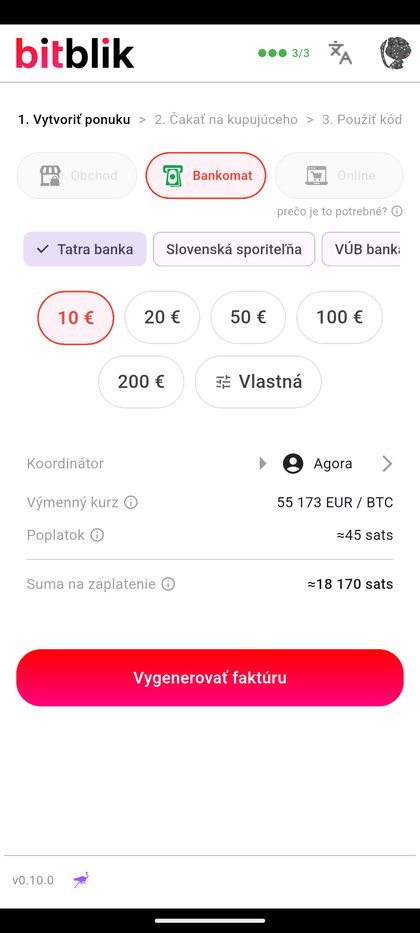
Tap “Pay a code — with bitcoin”, choose ATM, then the
bank and the amount. Presets are €10 / 20 / 50 / 100 / 200.
Pick the bank whose ATM you can actually walk to — the code works nowhere else.
Check the map above before you publish.
Premium: want it filled? Leave it at 0%
The premium is an optional markup over the market rate. With it you lock
fewer sats for the same cash — you are spending your bitcoin at a better
price and the difference stays with you. It is off until you switch it on in the settings,
and the coordinator caps how high it can go.
The other side sees the premium on your offer and picks accordingly. The higher
it is, the longer the offer sits there unaccepted — 0% fills fastest.
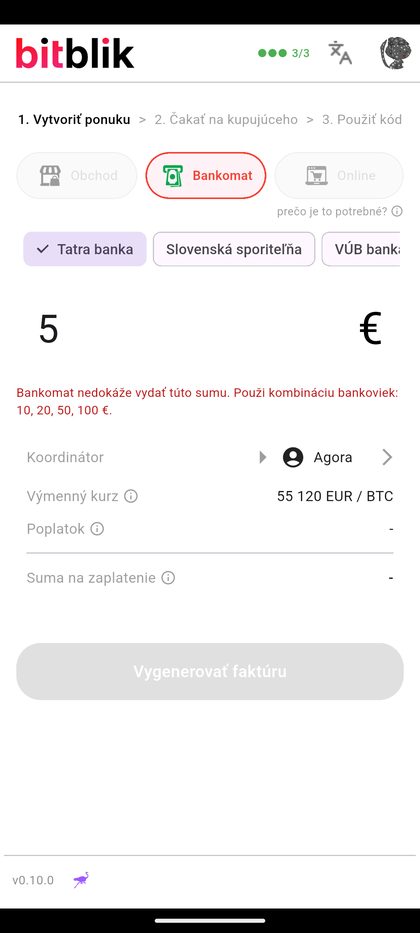
Custom amount? Only what an ATM can dispense
The app refuses amounts that cannot be built from banknotes. Try €5 and it tells you:
“The ATM cannot dispense this amount.” So the real minimum is €10.
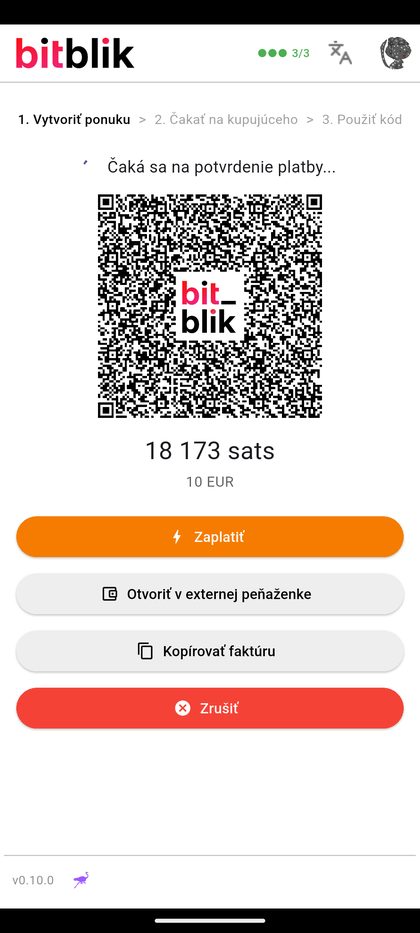
Lock the sats
You pay a hold invoice from your wallet. From this moment the sats are in escrow —
no longer freely yours, but nobody can hand them to the other side without your confirmation.
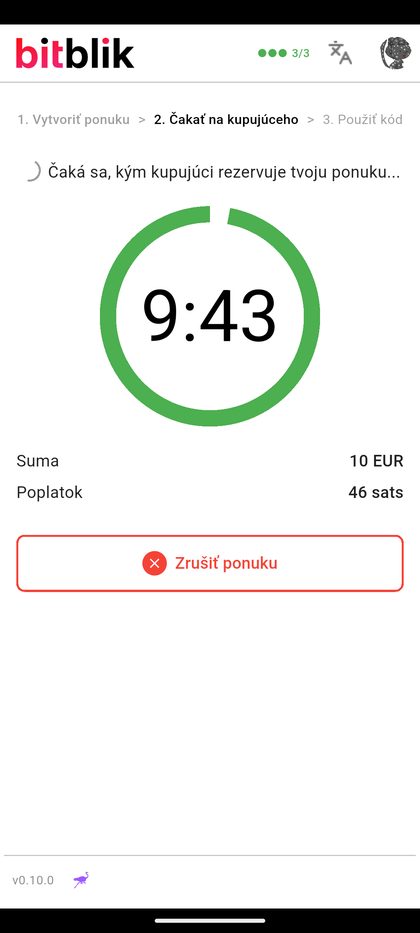
Wait for someone to take it
The offer stays public for 10 minutes. If nobody accepts it, the invoice is cancelled and
you get everything back.
Publish it when you are already standing at the ATM, not on the way there.
Go to the ATM
You get the six-digit code plus exact instructions and a link to that bank's ATM map.
On the ATM screen choose cardless withdrawal — in Slovak
Výber bez karty or Výber cez mobil —
and type the code. No card needed. Slovak ATMs have an English menu;
switch the language first if you like.
Confirm — and it's irreversible
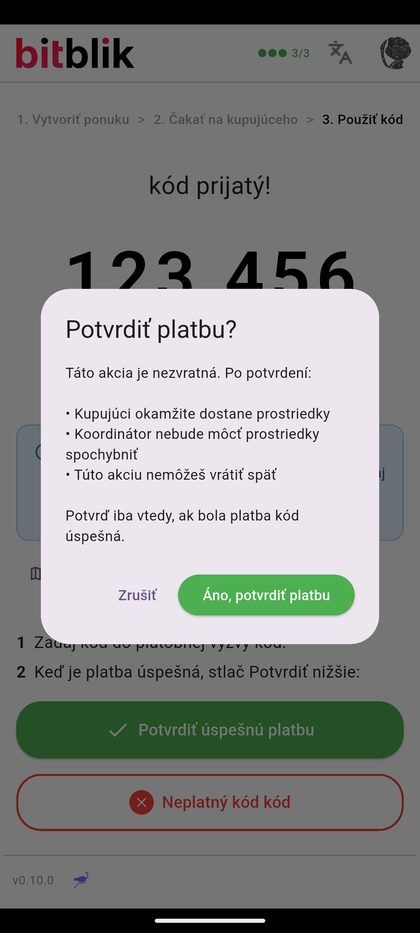
Only once the banknotes are in your hand, tap “Confirm successful payment”.
The app asks you to confirm twice on purpose: after that the sats are paid out to the
other side immediately and it cannot be undone.
Open the offer list
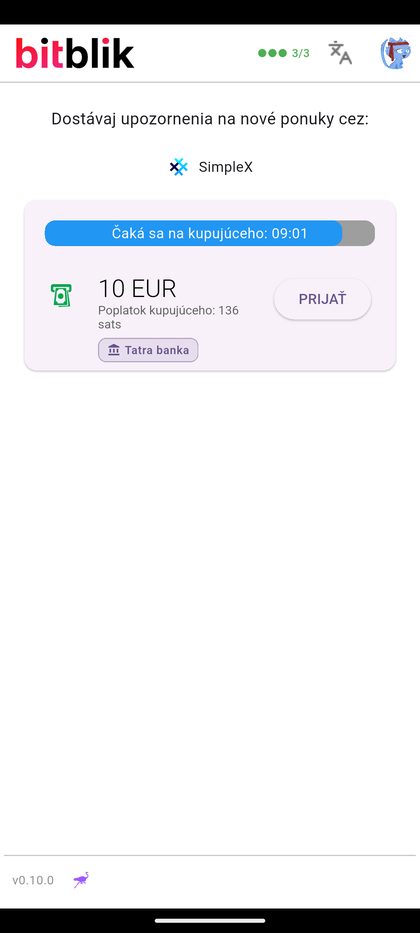
On the home screen tap “Buy bitcoin — with a code”. You will see the open
offers: the amount in euros, your fee and the bank tag of the ATM the
spender picked. Only accept an offer for the bank you actually have an account with.
If an offer also carries a pink +X% premium tag, you are buying
above the market rate — the same euros get you fewer sats. Offers without
a premium are at market.
An offer lives 10 minutes. If you see none, nobody is offering right now —
turn on notifications through the SimpleX link on that same screen.
Generate the code in your banking app
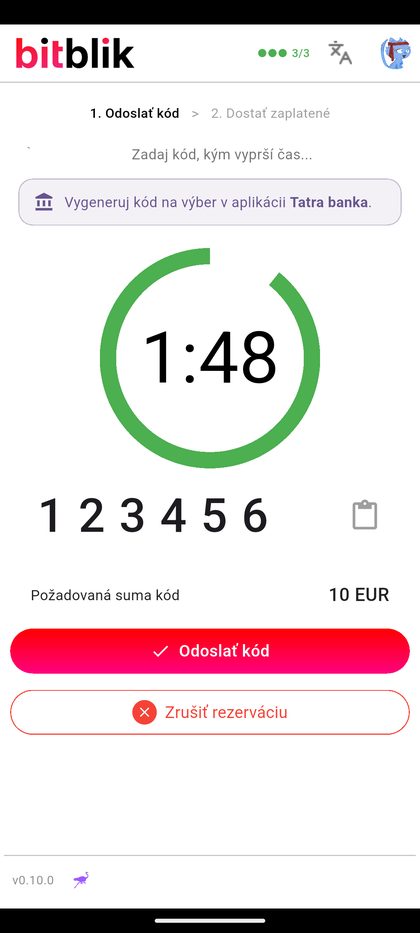
After accepting you have 120 seconds. Switch to your banking app and have it
issue a cardless withdrawal code for exactly the same amount as the offer.
Which is why it pays to have the banking app open before you accept.
Type the code and send it
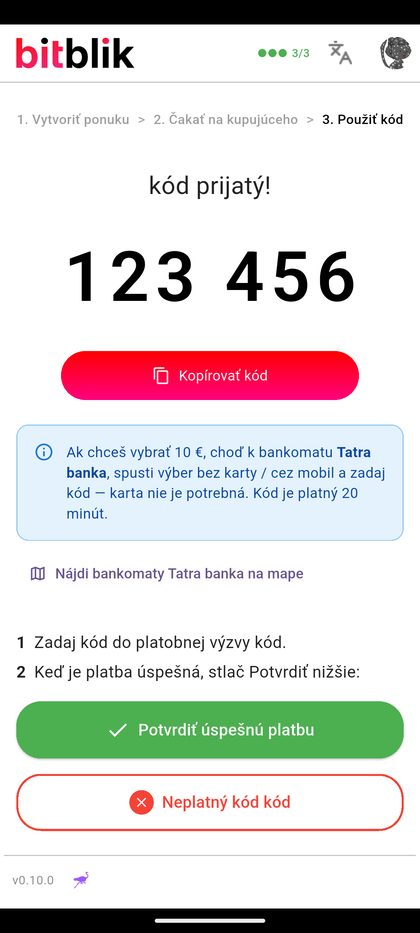
Six digits into the veks.li app, then “Send code”. Careful — right below it sits
“Cancel reservation”, easy to hit by mistake.
Wait for the withdrawal
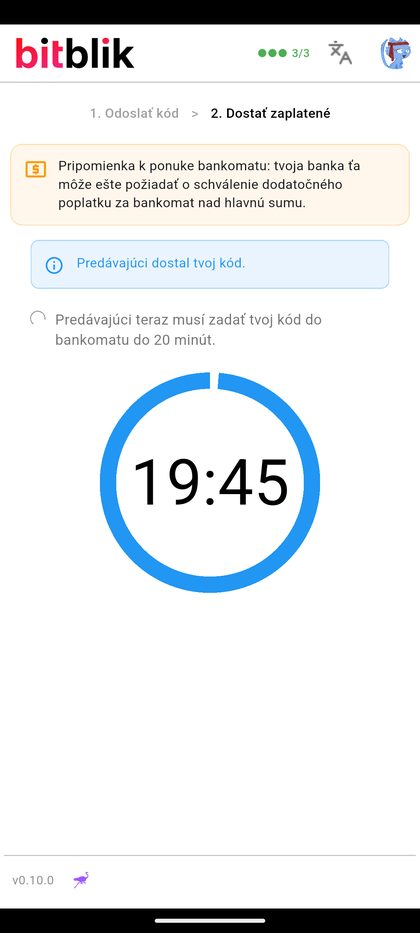
The app counts down the time the spender has to withdraw — 20 minutes with Tatra banka.
That is when the amount leaves your account.
Your bank may add its own ATM fee on top. The app warns you about it.
You get the sats
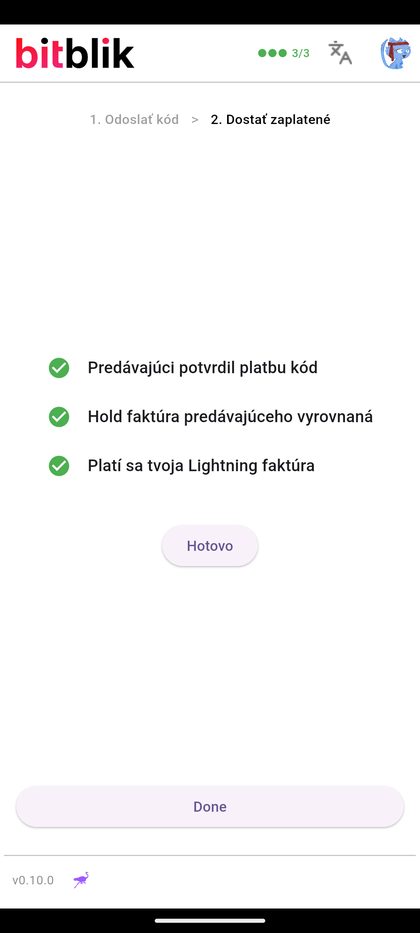
Once the spender confirms, the coordinator releases the escrow and pays your Lightning
invoice. The whole trade takes minutes, not hours.
06 — Disputes
When something goes wrong
Read this before you need it.
One rule above all others
The spender confirms only with banknotes in hand. The cash side opens a dispute only
when the money has really left the account. Most problems come from somebody clicking
before anything actually happened.
What the app does on its own
Situation
Timer
Outcome
Nobody accepts the offer
10 minutes
Invoice cancelled, the spender gets everything back.
Code not sent in time
120 seconds
The reservation drops, the offer goes back on the open list.
Spender never picks up the code
code validity
The code expires, the offer goes back on the open list. Nothing was debited.
The two sides disagree (conflict)
exactly 60 minutes
The escrow is settled in the coordinator's favour — the spender's sats are captured and no longer come back automatically. They are not paid to the other side either: the money waits for a human decision.
Worked examples
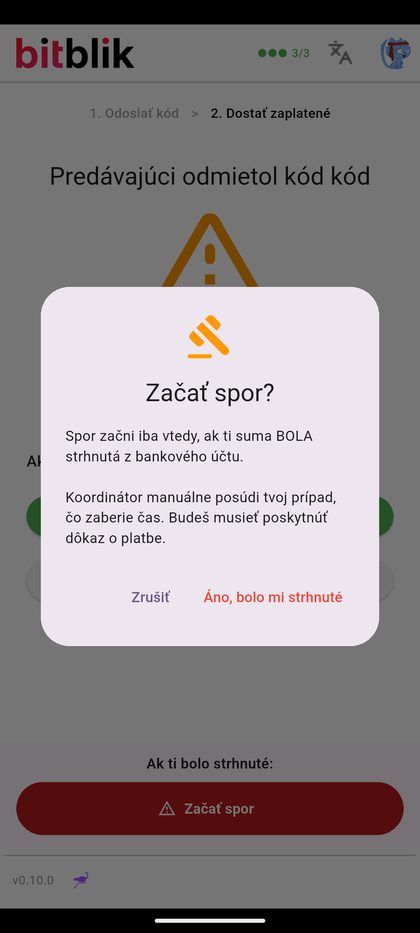
Fraud The spender withdrew the cash but claims the code failed
The classic. They took the money and then hit “Invalid code” in the app, hoping to
get the escrow back and keep the cash too.
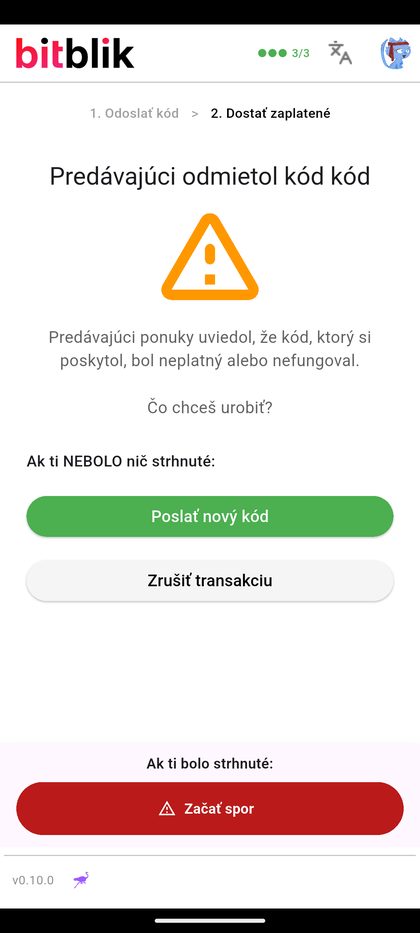
What you see on the cash side: a screen asking you the only question that matters —
whether the money did or did not leave your account.
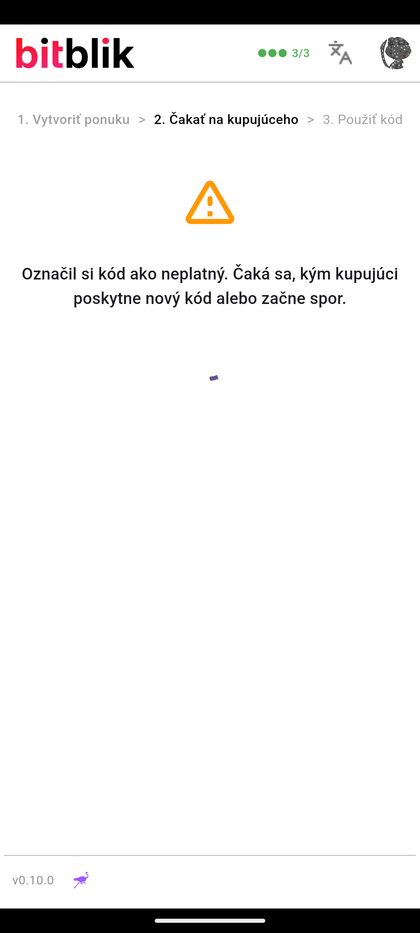
The spender marks the code invalidYou answer from your own account, not from the story
Do this: if the amount left your account, tap “Start dispute”.
If it did not, nothing happened — send a new code or cancel the trade.
Don't do this: never send a second code if the first one was already debited.
You would be paying twice. The app warns you about it too.
Fraud The cash side sends a made-up or already used code
The spender stands at the ATM for nothing. The fix is simple: “Invalid code”.
The offer returns to the open list and finds another counterparty — the escrow goes nowhere.
Do this: never press “Confirm successful payment” before the
ATM has handed you the money. That button is the only thing that can take your sats away.
Misunderstanding The code expired before the spender reached the ATM
Most often with VÚB, which has the shortest window of the supported banks. It costs nobody anything:
nothing was debited, the offer returns to the open list.
Neither side can see where the other one is, so the responsibility is shared:
Spender: publish an ATM offer only when you are standing at the ATM.
With VÚB you have 10 minutes from the moment the code is sent.
Cash side: never generate the code in advance — only after accepting, and send it
immediately. If the trade falls through, cancel the pending withdrawal in your banking app.
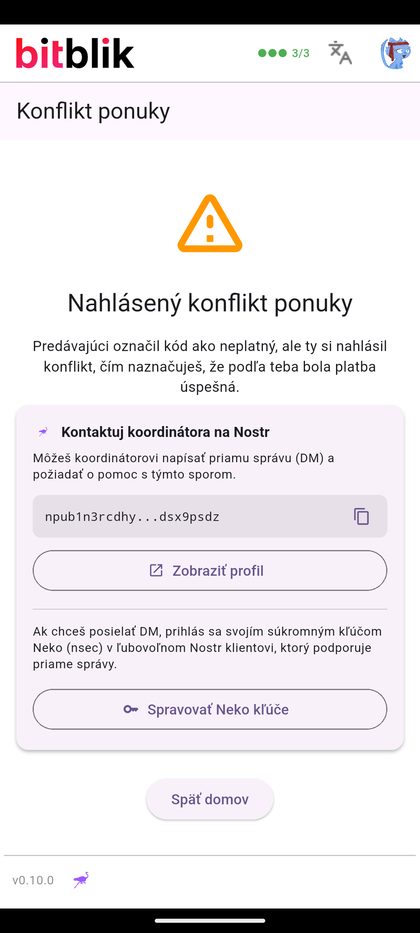
Dispute Both sides stick to their story
If the spender marks the code invalid and the other side says “it was debited”, you get a
conflict. The app shows the coordinator's contact — a Nostr address you can send a
direct message to, with your bank statement attached.
Open a dispute only with evidenceThe coordinator settles it over a Nostr DM
Have ready: a statement or screenshot from your banking app showing the amount,
the time, and that it was a cardless withdrawal. Without evidence the coordinator is just another
person hearing two contradictory claims.
What happens if nobody intervenes — measured live
We played this scenario out on the live market and let it run untouched. To the second:
23:24:45spender picked up the code
23:26:31spender marked it invalid
23:29:34cash side reported the money had left the account → conflict
00:29:35exactly 60 minutes later the system escalated it to a dispute by itself
At that escalation the hold invoice was settled — the spender's sats were captured and
will not come back automatically. They were not paid out to the other side either.
The money stayed with the coordinator and the trade waits for a human decision; both sides see the
coordinator's Nostr contact on that same screen.
The lesson: an hour of silence does not decide the dispute in your favour — it just
freezes the state and hands the case to a human. Contact the coordinator immediately, with evidence,
instead of waiting for the timer.
07 — FAQ
Questions visitors ask
Q · 01Do I need a Slovak bank account?
Not to spend bitcoin and take the cash — that side needs nothing but your phone and
a walk to the ATM. You only need an account at Tatra banka, SLSP, VÚB or Prima banka for the other side of
the trade, where the cash leaves your account. As a visitor you will be on the spending side.
Q · 02Do I have to meet anyone?
No. There is no physical handover — the counterparty stays wherever they are and you stand
alone at a bank ATM. That is the main practical difference from a classic P2P cash trade.
Q · 03What does it cost?
The fee is set by the coordinator your trade runs through — it is not part of the app or
the protocol and it differs between coordinators. The app shows it on every offer
before you confirm, in sats and in euros. The bank may add its own ATM fee on the
cash side.
Q · 04What is the premium on an offer?
An optional markup over the market rate, set by the side that spends the bitcoin:
for the same cash they lock fewer sats, so they spend at a better price and keep the difference.
The other side sees it on the offer and pays above market. It is off by default (0%) and the
coordinator caps it. Offers with a premium take longer to fill — if what you want
is a trade that actually happens, leave it at 0%.
Q · 05What is the smallest and the biggest trade?
Smallest €10 — an ATM cannot dispense less. The ceiling is the limit of the other side's bank
(€200 at Tatra banka, €500 at SLSP and VÚB; for Prima banka check its app) and how much anybody is offering at that moment.
For a bigger amount, do several trades rather than one.
Q · 06I don't speak Slovak. Will I manage at the ATM?
Yes. Slovak ATMs have an English menu — switch the language first and look for
cardless withdrawal / withdrawal without card. In Slovak the same option reads
Výber bez karty or Výber cez mobil.
Q · 07Does the app have to stay open?
Yes, both sides must be online at the same time. The whole trade takes minutes, not hours —
so do it when you have a stable connection, not while boarding a bus.
Q · 08Where do my sats sit before I spend them?
In a wallet inside the app. The built-in Cashu wallet is the simplest — top it up with a
Lightning invoice before you travel. If you run your own node, connect it over NWC.
Q · 09Is veks.li a Slovak project?
Yes. veks.li is the Slovak edition of the open BitBlik project, which started in Poland
with BLIK codes. The Slovak support was written by the local community and runs on a Slovak coordinator.
Important notice
Cardless withdrawal is intended by the banks for withdrawing the account holder's
own cash. Using it to hand money to another person may breach the bank's terms
and conditions, and at larger volumes may touch other regulations as well. Tatra banka states
this explicitly in its terms. You use veks.li at your own risk; for anything sizeable, talk to a
lawyer — including about how your home country treats spending bitcoin. This page is a guide,
not legal or investment advice.